

Thread Rating:
  • 0 Vote(s) - 0 Average
  • 1
  • 2
  • 3
  • 4
  • 5
Automation lamps A16_V3+E16_V2 with traditional switch
#1
Information 
Hello,
After watching some videos on YouTube, I started my home lighting automation project.

Using the A16_V3 + E16_V2 hardware and KCS v3.15.0 software.

I'm using a traditional doorbell switch as input and I'm having trouble getting it to work.
   
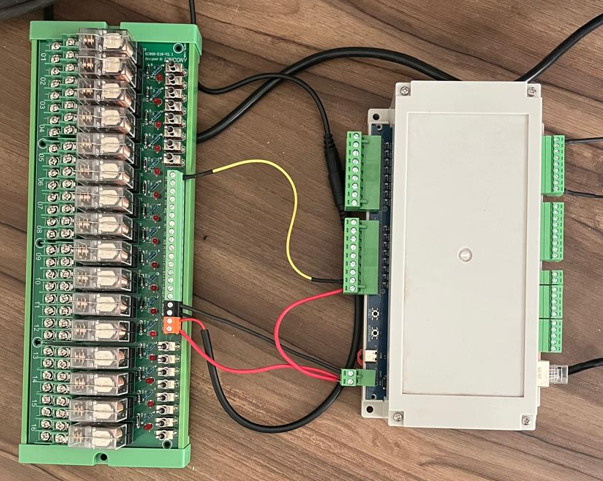
I made the connection between A16_V3 and E16 as follows:
I suspect my problem is that I'm connecting to digital input 1 + GRD.
Where am I going wrong? How do I use it with a traditional switch?
   
Reply
#2
download KCS v3 for A16v3. connect your switch panel wire to A16v3's digital input port.
set by IFTTT:
IF DI1 = True THEN DO1=  toggle
IF DI1 = False THEN DO1=  toggle
Reply
#3
I managed to solve the problem. I watched the YouTube videos, which are quite up-to-date; I was looking for older videos and didn't notice this change.
For anyone having the same problem, watch the video below; it's very intuitive.

https://www.youtube.com/watch?v=ALClGLHPLQ8
Reply
#4
What type of wire cable do you recommend buying? I think CAT cable has "too many wires" and I would be filling the conduit with wires that I might not use.
What 2-wire cables do you recommend? I found shielded 2x26 AWG cable for sale in my country (the wire gauge is approximately 0.13mm2).
Will there be any kind of delay when using it within 500 meters?
   
Reply
#5
you can use any cable for digital input, no delay.
Reply
#6
Can I use the SSD1315 LCD? I already have one and, from what I've researched, it's compatible with the SSD1306.
What screw is used to secure the SSD1306? How did you leave the LCD outside the case?
Reply
#7
i am not sure, you can try . KCS firmware design for SSD1306. maybe you can use ESPHome.
screw: 2*3mm size. sorry, the LCD inside of the box.
Reply
#8
I tested it with SSD1315 LCD + KCS firmware and it worked normally, I didn't need to do anything, I just plugged it in and turned it on the A16_V3.
Reply
#9
ok, good, it compatible with ssd1306 software.
Reply


Forum Jump:


Users browsing this thread:
1 Guest(s)