




In the root of the hassos-boot partition, add a new folder called CONFIG.
In the CONFIG folder, add another new folder called modules.
Inside the modules folder add a text file called rpi-i2c.conf with the following content:
i2c-dev
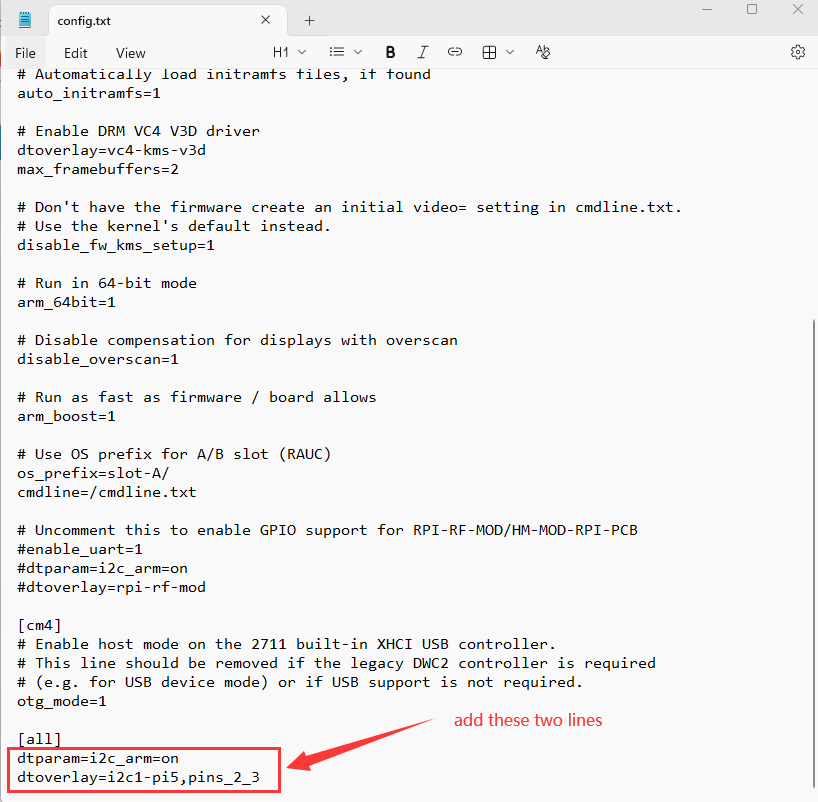
In the root of the hassos-boot partition, edit the file called config.txt at last add two lines to it:
dtparam=i2c_arm=on
dtoverlay=i2c1-pi5,pins_2_3
restart home assistant.
how to check whether have enabled i2c bus for home assistant, see here: https://www.kincony.com/forum/showthread.php?tid=9075
In the CONFIG folder, add another new folder called modules.
Inside the modules folder add a text file called rpi-i2c.conf with the following content:
i2c-dev
In the root of the hassos-boot partition, edit the file called config.txt at last add two lines to it:
dtparam=i2c_arm=on
dtoverlay=i2c1-pi5,pins_2_3
restart home assistant.
how to check whether have enabled i2c bus for home assistant, see here: https://www.kincony.com/forum/showthread.php?tid=9075
YouTube: https://www.youtube.com/c/KinCony
Online Store: https://shop.kincony.com
Alibaba Store: https://kincony.en.alibaba.com/
Online Store: https://shop.kincony.com
Alibaba Store: https://kincony.en.alibaba.com/