

Thread Rating:
  • 0 Vote(s) - 0 Average
  • 1
  • 2
  • 3
  • 4
  • 5
No AP appears
#1
I just bought the KS868 A6 board and successfully flashed the firmware according to the instructions. However, after reconnecting the power, I can't detect the Wi-Fi access point. When power is applied, the red LED near the power connector lights up, and all relays click. No other activity on the board. Tried firmware KCS_KC868_A6_V2.2.13 and KCS_KC868_A6_V2.2.14. My board arrived in a very dented package, so I'm concerned about the Wi-Fi module. Is there any way to diagnose the Wi-Fi module? Could this issue be related to me temporarily using a DC 12V 1A?
Reply
#2
can you take photo , how you wire your board.
usually we suggest use DC12V 2A power supply.
Reply
#3
(08-13-2025, 01:37 PM)admin Wrote: can you take photo , how you wire your board.
usually we suggest use DC12V 2A power supply.


Reply
#4
Plugged the board into a 2A DC adapter, but the hotspot didn’t show up.

Plugged the board into a 2A DC adapter, but the AP didn’t show up.
Reply
#5
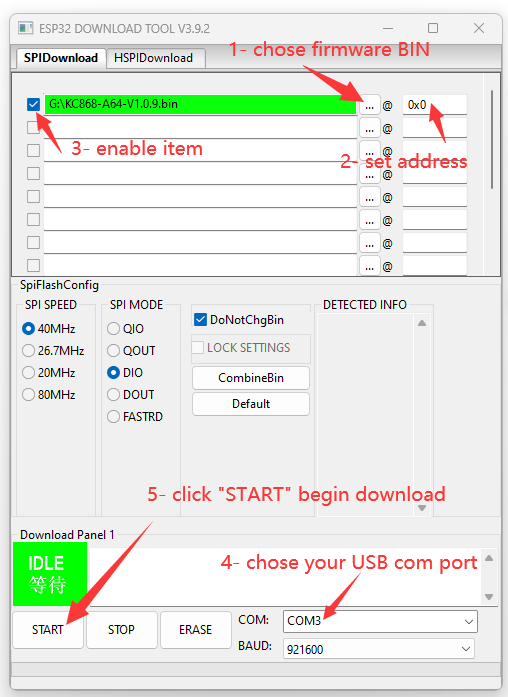
because you have not downloaded firmware, you have not selected first row. see my photo step3: enable item.
[Image: esp32_download_tool_2.png]
Reply
#6
Oops, my bad—missed that line. Always double-check the instructions! Thanks for saving me!
Reply
#7
Title:  KC868-A6 SoftAP Web Server using Flowcode - Getting
Code:
ERR_CONNECTION_REFUSED
Body: Hello KinCony Team and Community,
I am working with the KC868-A6 board (ESP32 version) using Flowcode 11. My goal is to set up the board as a standalone Wi-Fi Access Point (SoftAP) to control the 6 relays via a local web browser interface (
Code:
192.168.4.1
).
The Problem: Although the ESP32 successfully creates and broadcasts the Wi-Fi Access Point (and my phone/PC connects to it without issues), whenever I try to open
Code:
[http://192.168.4.1](http://192.168.4.1)
in the browser, it immediately fails with
Code:
ERR_CONNECTION_REFUSED
.
My Current Logic Structure in Flowcode:
  1. Code:
    PCF8574::Initialise()
  2. Code:
    WLAN_ESP32::Initialise()
  3. Code:
    WLAN_ESP32::CreateAccessPoint("AHMED-KC868-A6", "12345678", 1, 3)
  4. Code:
    6 seconds delay
  5. Code:
    WLAN_ESP32::SocketListen(80)
  6. Inside
    Code:
    Loop forever
    :
    • Code:
      WLAN_ESP32::SocketRead(...)
    • Checking HTTP GET requests (
      Code:
      /r1/on
      ,
      Code:
      /r1/off
      , etc.) and updating
      Code:
      PCF8574::WritePort
    • Code:
      SocketWrite
      (HTTP 200 OK header & HTML chunks)
    • Code:
      WLAN_ESP32::SocketClose()
    • Code:
      WLAN_ESP32::AcceptClose()
    • Code:
      WLAN_ESP32::AcceptOpen()
    • Code:
      100 ms delay
My Question: What is the correct macro sequence and logic in Flowcode to properly handle incoming HTTP connections on port 80 for the KC868-A6? Why is the browser getting a "Connection Refused" error even though the socket is listening and AP is active?
Any example flowchart or guidance would be greatly appreciated. Thank you!


Attached Files Image(s)
   
Reply
#8
Title: KC868-A6 SoftAP Web Server using Flowcode - Getting
Code:
ERR_CONNECTION_REFUSED
Body: Hello KinCony Team and Community,
I am working with the KC868-A6 board (ESP32 version) using Flowcode 11. My goal is to set up the board as a standalone Wi-Fi Access Point (SoftAP) to control the 6 relays via a local web browser interface (
Code:
192.168.4.1
).
The Problem: Although the ESP32 successfully creates and broadcasts the Wi-Fi Access Point (and my phone/PC connects to it without issues), whenever I try to open
Code:
[http://192.168.4.1](http://192.168.4.1)
in the browser, it immediately fails with
Code:
ERR_CONNECTION_REFUSED
.
My Current Logic Structure in Flowcode:
  1. Code:
    PCF8574::Initialise()
  2. Code:
    WLAN_ESP32::Initialise()
  3. Code:
    WLAN_ESP32::CreateAccessPoint("AHMED-KC868-A6", "12345678", 1, 3)
  4. Code:
    6 seconds delay
  5. Code:
    WLAN_ESP32::SocketListen(80)
  6. Inside
    Code:
    Loop forever
    :
    • Code:
      WLAN_ESP32::SocketRead(...)
    • Checking HTTP GET requests (
      Code:
      /r1/on
      ,
      Code:
      /r1/off
      , etc.) and updating
      Code:
      PCF8574::WritePort
    • Code:
      SocketWrite
      (HTTP 200 OK header & HTML chunks)
    • Code:
      WLAN_ESP32::SocketClose()
    • Code:
      WLAN_ESP32::AcceptClose()
    • Code:
      WLAN_ESP32::AcceptOpen()
    • Code:
      100 ms delay
My Question: What is the correct macro sequence and logic in Flowcode to properly handle incoming HTTP connections on port 80 for the KC868-A6? Why is the browser getting a "Connection Refused" error even though the socket is listening and AP is active?
Any example flowchart or guidance would be greatly appreciated. Thank you!


Attached Files Image(s)
   
Reply
#9
you can download with KCS v2 firmware firstly.
here is KCS v2 online guide: https://www.kincony.com/esp32-kcsv2-firmware.html
Reply


Forum Jump:


Users browsing this thread:
1 Guest(s)