Welcome, Guest
You have to register before you can post on our site.

Username
  

Password


Search Forums

(Advanced Search)

Forum Statistics
» Members: 8,430
» Latest member: Emanda
» Forum threads: 3,694
» Forum posts: 19,014

Full Statistics

Online Users
There are currently 27 online users.
» 0 Member(s) | 15 Guest(s)
AhrefsBot, Amazonbot, Crawl, Google, PetalBot, bot

Latest Threads
flash kc868-a4
Forum: KC868-A series and Uair Smart Controller
Last Post: Michel.nadin
45 minutes ago
» Replies: 16
» Views: 590
[arduino code examples fo...
Forum: B4 (under designing)
Last Post: admin
6 hours ago
» Replies: 0
» Views: 3
[arduino code examples fo...
Forum: B4M (under designing)
Last Post: admin
6 hours ago
» Replies: 0
» Views: 1
[arduino code examples fo...
Forum: B4 (under designing)
Last Post: admin
6 hours ago
» Replies: 0
» Views: 4
[arduino code examples fo...
Forum: B4M (under designing)
Last Post: admin
6 hours ago
» Replies: 0
» Views: 3
[arduino code examples fo...
Forum: B4 (under designing)
Last Post: admin
6 hours ago
» Replies: 0
» Views: 1
[arduino code examples fo...
Forum: B4M (under designing)
Last Post: admin
6 hours ago
» Replies: 0
» Views: 1
[arduino code examples fo...
Forum: B4 (under designing)
Last Post: admin
6 hours ago
» Replies: 0
» Views: 2
[arduino code examples fo...
Forum: B4M (under designing)
Last Post: admin
6 hours ago
» Replies: 0
» Views: 4
[arduino code examples fo...
Forum: B4 (under designing)
Last Post: admin
6 hours ago
» Replies: 0
» Views: 1

  add PWM to Server16 (raspberry pi4 GPIO) by ha-rpi_gpio_pwm in HA
Posted by: admin - 04-02-2024, 07:09 AM - Forum: KinCony Server-Mini / Server-16 Raspberry Pi4 relay module - No Replies

https://github.com/RedMeKool/HA-Raspberry-pi-GPIO-PWM

Print this item

  add DS18B20 sensor to Server16 (raspberry pi4 GPIO) by 1-Wire via Sys Bus in HA
Posted by: admin - 04-02-2024, 06:15 AM - Forum: KinCony Server-Mini / Server-16 Raspberry Pi4 relay module - No Replies

   
1. install "1-Wire via Sys Bus" component on HACS
   
2. add dtoverlay=w1-gpio,gpiopin=17  command line to TF card->config.txt
for example, this use GPIO17 of CM4 connect with DS18B20 temperature sensor.
if you use GPIO16, command is  dtoverlay=w1-gpio,gpiopin=16
   
so you can add different GPIOs for different 1-wire device.

3. Raspberry Pi checking connected devices via ssh
If you set up ssh, you can check the connected one-wire devices in the following folder: /sys/bus/w1/devices The device IDs begin with 28-.
   

After installed the package in HACS, install the 1-Wire SysBus integration under Setttings-> Devices & services.
   

Entities
Upon startup of the platform, the 1-wire bus is searched for available 1-wire devices creates entities based on the sensor unique id:
sensor.28.FF5C68521604_temperature
   

Print this item

  KinCony Server16 home assistant yaml for Relay and Digital input
Posted by: admin - 04-02-2024, 04:38 AM - Forum: KinCony Server-Mini / Server-16 Raspberry Pi4 relay module - No Replies


Code:
binary_sensor:
  - platform: mcp23017
    i2c_address: 0x20
    invert_logic: true
    pins:
      0 : Button_1
      1 : Button_2
      2 : Button_3
      3 : Button_4
      4 : Button_5
      5 : Button_6
      6 : Button_7
      7 : Button_8
      8 : Button_9     
      9 : Button_10     
      10 : Button_11     
      11 : Button_12     
      12 : Button_13     
      13 : Button_14     
      14 : Button_15
      15 : Button_16

     
switch:
  - platform: mcp23017
    i2c_address: 0x22
    hw_sync: false
    invert_logic: true
    pins:
      0 : Output_1
      1 : Output_2
      2 : Output_3
      3 : Output_4
      4 : Output_5
      5 : Output_6
      6 : Output_7
      7 : Output_8
      8 : Output_9
      9 : Output_10
      10 : Output_11
      11 : Output_12
      12 : Output_13
      13 : Output_14
      14 : Output_15
      15 : Output_16
download ymal: 

.txt   Server16_HA_config.txt (Size: 919 bytes / Downloads: 354)
use by mcp23017 for HACS github link: https://github.com/jpcornil-git/HA-mcp23017

Print this item

  KinCony Cloud Server will stop service in 2025 upgrade to TUYA app
Posted by: admin - 04-02-2024, 04:12 AM - Forum: News - Replies (15)

KinCony Cloud server have worked almost 10 years for user freely use.
at the beginning of 2025, will stop service. In order to have a better user experience, we suggest use Tuya app with Tuya cloud server. There are two solution for update your OLD controller to use tuya app.

1. replace with new relay controller for more powerful functions.

8 channel old relay controller: replace with KC868-E8T or KC868-A8S or KC868-A8Sv2
16 channel old relay controller: replace with F16 controller
32 channel old relay controller: replace with A32 Pro controller

2. add tuya adapter let your old controller work with tuya app and support voice control by alexa and google home speaker.

8 channel old relay controller (KC868-H8/H8W):
add tuya adapter v2:https://www.kincony.com/esp32-tuya-iot-adapter-v2.html
video tour: https://youtu.be/zSOtzTXvUiI

16 channel old relay controller (KC868-H16/H16W):
add tuya adapter v2:https://www.kincony.com/esp32-tuya-iot-adapter-v2.html
video tour: https://youtu.be/6jevfQFY9A0

32 channel old relay controller (KC868-H32, H32L, H32LW, H32B, H32BS):
add tuya adapter v1:https://www.kincony.com/esp32-tuya-iot-adapter.html
video tour: https://youtu.be/z67pRMLb4Rc

Print this item

  how to compile new tasmota firmware by simplest way
Posted by: admin - 04-01-2024, 02:07 AM - Forum: KC868-A series and Uair Smart Controller - Replies (5)

1. use Gitpod, you just need a web browser: https://tasmota.github.io/docs/Gitpod/

2. for example:  we make a new tasmota firmware for ESP32 MATTER + enable PCF8574 i2c bus chip.
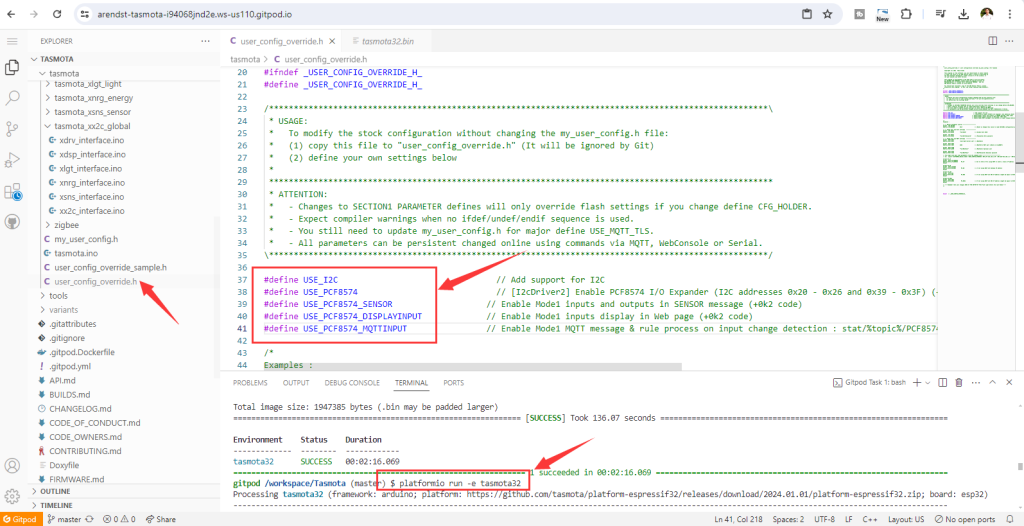
   

3. When compiling your build add the following to user_config_override.h
#define USE_I2C                                // Add support for I2C
#define USE_PCF8574                            // [I2cDriver2] Enable PCF8574 I/O Expander (I2C addresses 0x20 - 0x26 and 0x39 - 0x3F) (+2k1 code)
#define USE_PCF8574_SENSOR                  // Enable Mode1 inputs and outputs in SENSOR message (+0k2 code)
#define USE_PCF8574_DISPLAYINPUT            // Enable Mode1 inputs display in Web page (+0k2 code)
#define USE_PCF8574_MQTTINPUT                // Enable Mode1 MQTT message & rule process on input change detection : stat/%topic%/PCF8574_INP = {"Time":"2021-03-07T16:19:23+01:00","PCF8574-1_INP":{"D1":1}} (+0k5 code)

4. after SAVE the FILE, then run command:   "platformio run -e tasmota32"
Command "platformio run -e tasmota32"  is correct for ESP32 builds,  "platformio run -e tasmota"  is only for esp8266 builds.

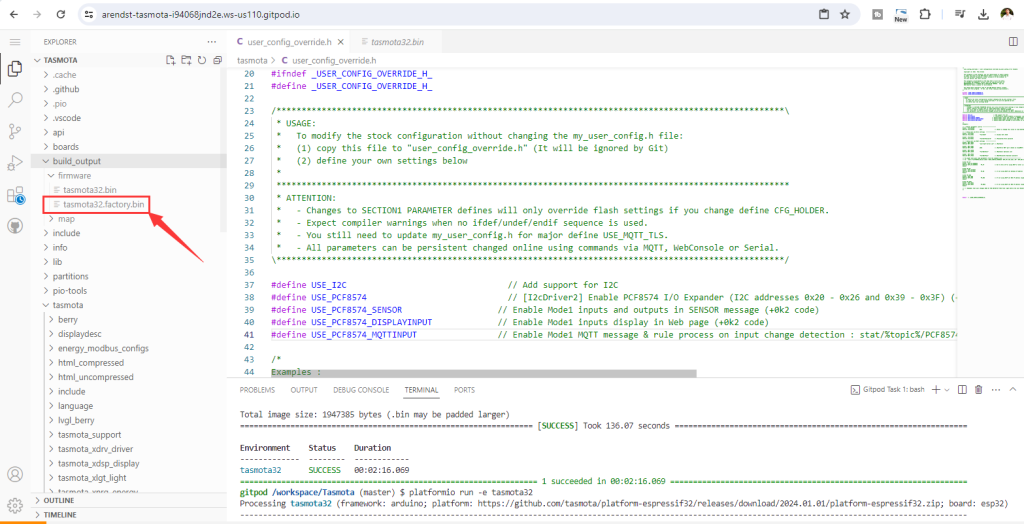
5. after compiled, download "tasmota32.factory.bin". 
   

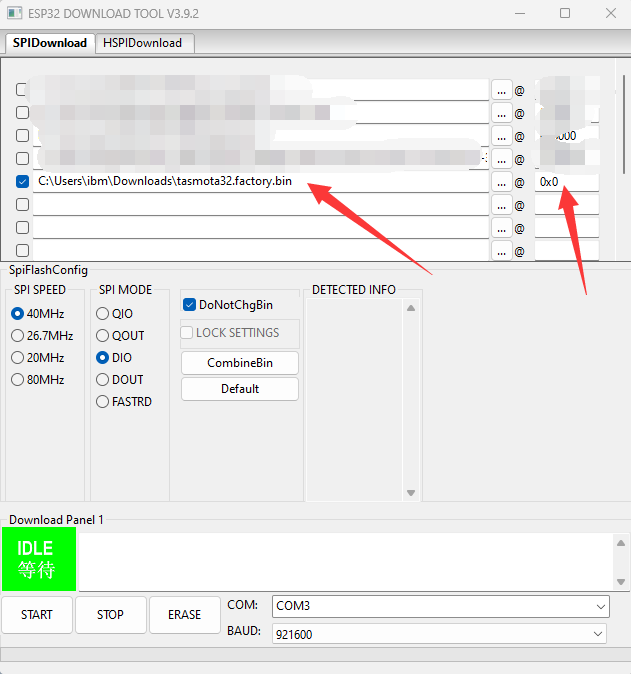
6. then use ESP DOWNLOAD TOOL write to ESP32 in address 0x0
   

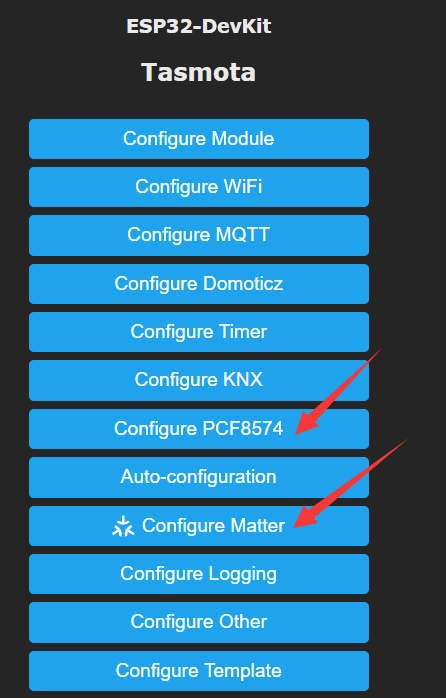
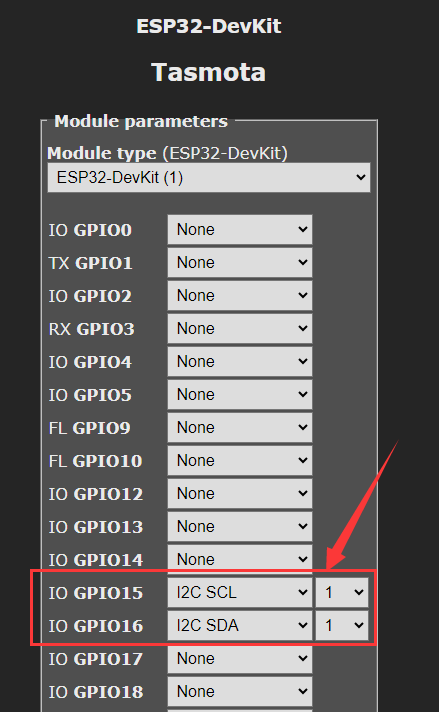
7. after re power on of ESP32 board, you can connect with tasmota, config it with I2C SDA and SCL pins firstly, then you can see the PCF8574 option and MATTER option.


Tasmota ESP32 MATTER+PCF8574 firmware download (after downloaded the ZIP file, you need to unzip get the BIN file)

.zip   tasmota32.factory.zip (Size: 1.69 MB / Downloads: 815)

Print this item

  which board uses SX1278 LORA???
Posted by: masoos - 03-30-2024, 09:19 PM - Forum: DIY Project - Replies (1)

Hi, which board you show in the picture for SX1278 Wireless Transceiver Module Lora 868Mhz? It has Lora and a small OLED display :-) I want this!!!!

https://ae01.alicdn.com/kf/U580db2b9a8fb....jpg_.webp

https://www.aliexpress.com/item/10050042...2572425%21

Print this item

  Differences in protocols between H32B and H32B Pro?
Posted by: lulu01 - 03-30-2024, 08:34 PM - Forum: Development - Replies (2)

Hello,

I want to use a H32B and a H32B Pro with Home assistant.

For the H32B, I used this unofficial integration: https://github.com/fiLLLip/hass-components-sha. It uses the RELAY-SET- and RELAY-READ- commands; you can see the code here https://github.com/fiLLLip/hass-componen..._init__.py. This works very well.

The same code does not work for H32B Pro. Only about 50% of clicks on switches work, and I often get error messages such as 'Failed to call service switch/turn_on. 'NoneType' object has no attribute 'group''.

Is this normal? Do the H32B and the H32B Pro use different protocols? I found the page for the protocol used in H32B, is it not supposed to work the same on the Pro?

Thank you!

Print this item

  Help to choose the right board
Posted by: Bergoglio - 03-29-2024, 08:13 PM - Forum: KC868-A series and Uair Smart Controller - Replies (3)

Good afternoon,

I need an help to choose the right KC868-A model (I don't want to make a mistake because I must buy 21 pieces....)
My hardware minimum specs :

  1. the board must have an ethernet (rj45) port
  2. min 5 releays NO/NC max load 1 A at 230v
  3. I must connect to every board n. 4 temp sensors DS18B20
What is the best solution ?

Thanks

Print this item

  Firm ware
Posted by: STV - 03-29-2024, 01:06 PM - Forum: KC868-A8 - Replies (1)

Can i get Firmware v1.0.9 same as the video tutorial - 2023 new "KCS" firmware for KinCony ESP32 board detailed explanation

Print this item

  KinCony ESP32 Tuya IoT Adapter V2 released
Posted by: admin - 03-29-2024, 07:36 AM - Forum: News - No Replies

KinCony ESP32 Tuya IoT adapter V2 let relay board or IoT devices easy integrate to tuya IoT platform. We have designed by ESP32 work with Tuya module. Tuya module will connect with Tuya cloud server, when using tuya phone app, message will send to tuya wifi module and decode by ESP32. ESP32 support use arduino IDE to write code, get the tuya message and send any command to RS485 or network device. it’s a good convert tool for smart home automation DIY.

You can add ESP32 Tuya IoT adapter, let your KC868-A series board can use voice control by alexa or google home speaker.

adapter support to use “Tuya MCU SDK Arduino Library”

KC868-H32B,KC868-H32BS …. HxB series smart controller will be easy support TUYA phone application, alexa and google home voice control function.
[Image: esp32-tuya-adapter-v2-1.jpg][Image: esp32-tuya-adapter-v2-4.jpg]
[Image: esp32-tuya-adapter-v2-2.jpg]

[Image: esp32-tuya-adapter-pins-define.jpg]

[Image: esp32-tuya-adapter-v2-6.jpg]

Print this item